How to Spot a Deepfake Video: A Practical Checklist
How to spot a deepfake video in a few minutes: what to watch in the face, mouth and light, how to check key frames and the source, and where to report fakes in India.
Short answer: slow the video down and look at the face, the mouth and the light first; then take a screenshot of a clear frame and check it, and find where the clip first appeared. No single sign proves a video is fake, but three or four of them together, plus a source you cannot trace, are a strong warning. This checklist takes about five minutes and needs no special software.
Deepfake videos are no longer a lab curiosity. In India, the government's fact-checking unit has repeatedly flagged AI-generated videos of public figures used to sell fake investment schemes, including clips of the Finance Minister promising impossible monthly returns (NewsBytes on the PIB fact check). The same tricks show up in fake job interviews, "leaked" clips and family-emergency scams on WhatsApp.
Try it: use ProofAI's AI photo detector, free for 10 checks a day with no login.
Step 1: Watch the face closely
Researchers at the MIT Media Lab, who ran the public Detect Fakes project, point out that high-end deepfakes are almost always changes to the face. Their checklist, as summarised in this Illinois State University library guide, asks you to look at:
- Cheeks and forehead: is the skin too smooth or too wrinkly, and does its age match the hair and eyes?
- Eyes and eyebrows: do shadows fall where you would expect them?
- Glasses: is there glare, too much glare, and does it move naturally when the head turns?
- Facial hair and moles: do they look real, or slightly painted on?
- Blinking: does the person blink too little or too much?
- Lips: do their size and colour match the rest of the face?
Pause the video and step through it frame by frame. Many players let you slow playback to 0.25×, and glitches that are invisible at normal speed often show up between frames.
Step 2: Check the mouth and the voice
The mouth is hard to fake. In many deepfakes the teeth look blurred or merge into one white block, and the tongue barely appears. Then listen:
Want to check your own content? Try ProofAI free 10 checks a day, no login needed.
- Do the lips move exactly with the words, especially on "p", "b" and "m" sounds where the lips must close?
- Does the voice sound flat, oddly clean, or without breathing, background noise or room echo?
- Does the accent or the way of speaking match how this person really talks?
Voice cloning is now cheap, so a familiar voice is not proof on its own. If a "relative" or "boss" asks for money on a video call, hang up and call them back on the number you already have.
Step 3: Look at hands, light and the background
AI video generators still struggle with physics and small details:
- Hands: fingers that merge, change number or bend the wrong way.
- Light and shadows: shadows that flicker, point in different directions, or do not move with the person.
- Text in the scene: signs, logos or captions inside the video that change shape between frames.
- Edges: a halo or blur where the face meets the hair, ears or neck, especially when the head turns.
- Objects: things that appear, disappear or melt into the background.
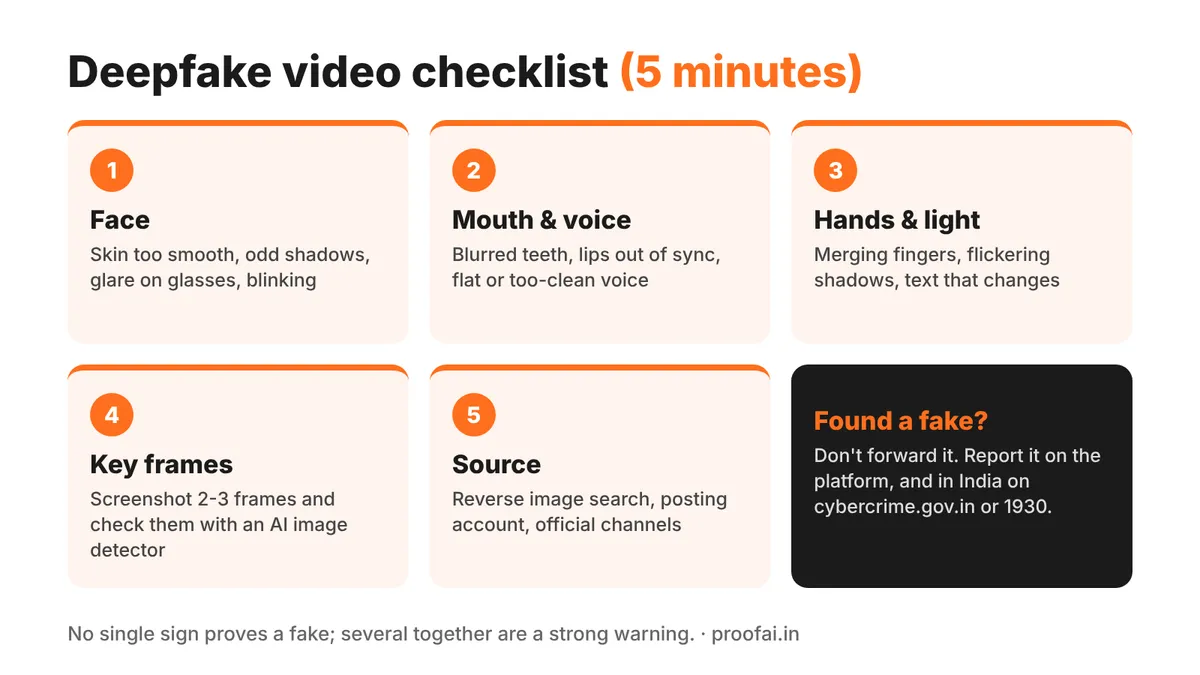
Deepfake video checklist: face, mouth and voice, hands and light, key frames, source
Also read: How to Spot AI-Generated Fake Reviews Before You Buy
Step 4: Check key frames with an image detector
You do not need a video tool to test a video. Pause on two or three clear frames that show the face or the main subject, take screenshots, and upload them to an AI image detector. Check more than one frame: a single frame can be misleading, and real videos that were heavily compressed (for example after being forwarded many times) are harder for any detector.
For the spoken words, copy the captions or a transcript into an AI text detector. A script that reads like generic AI text is one more signal, not proof.
ProofAI's own video detection is coming soon; until then, checking frames and the transcript is the most practical route.
Step 5: Trace the source
Most fakes fall apart when you look for where they came from:
- Reverse-search a key frame with Google Lens or TinEye. The original clip, often with a different context or date, frequently turns up.
- Check the account that posted it: how old it is, what else it posts, and whether the real person or organisation shared the same video on their official channels.
- Look for Content Credentials. Some cameras, editing apps and AI tools now attach signed "Content Credentials" (the C2PA standard) to files. You can upload a file to the Content Credentials Verify tool to read them (how the tool works). A missing credential does not mean a video is fake, because most software does not add them yet.
- Search the claim, not just the video: if a minister really announced a new scheme, official sites and major news outlets will say so.
Quick reference: the checklist
| Check | What to look for | Time |
|---|---|---|
| Face | Skin too smooth, odd shadows, glare on glasses, blinking | 1 min |
| Mouth and voice | Blurred teeth, lips out of sync, flat or too-clean voice | 1 min |
| Hands, light, background | Merging fingers, flickering shadows, changing text | 1 min |
| Key frames | Screenshot 2-3 frames, check with an image detector | 1 min |
| Source | Reverse image search, posting account, official channels, Content Credentials | 2 min |
What to do if you find a deepfake
- Do not forward it, even to warn people; share a fact-check instead.
- Report it on the platform (YouTube, Instagram, Facebook and X all have options for manipulated or impersonating media).
- Report fraud in India on the National Cyber Crime Reporting Portal (cybercrime.gov.in) or by calling the cybercrime helpline 1930, especially if money was asked for or lost.
- Ask PIB Fact Check about videos involving the Government of India; they publish debunks of fake clips (example).
- If the video uses your face or voice, keep copies and links, report it to the platform, and see our guide to India's AI labelling rules for what platforms must now do.
What this checklist cannot do
No checklist and no detector catches every fake. The best deepfakes pass a casual look, and some genuine videos look strange because of poor lighting, filters or heavy compression. Detection tools give probabilities, not verdicts. There is no method that works every time. Treat the signs above as reasons to verify, and the source check as the deciding step.
FAQ
Can you tell if a video is a deepfake just by watching it? Sometimes. Faces, mouths, hands and lighting often give cheap deepfakes away, especially when you slow the video down. Good deepfakes can pass a normal viewing, which is why checking the source matters most.
Is there a free AI video detector? Several online tools claim to detect AI video, with mixed results. A free route that works today is to screenshot key frames and check them with a free AI image detector, and to check the transcript with an AI text detector.
How do I check a video I received on WhatsApp? Forwarded videos are heavily compressed, so look first at the source: search for the claim, reverse-search a frame, and check official channels. Do not forward it until you know it is real.
What should I do if someone made a deepfake of me? Save the video, links and account names, report it to the platform, and report it on cybercrime.gov.in or by calling 1930 if it is used for fraud, harassment or blackmail.
Conclusion
Spotting a deepfake is mostly about slowing down: watch the face and mouth frame by frame, check a few frames with an image detector, and trace the clip back to its source before you believe or share it. A few minutes of checking is usually enough to stop a fake from spreading.
Published by
AI tools may assist with drafting; a team member checks and approves every article before it is published. How we write and correct articles.


Popular AI detection tools
Ready to Verify Your Content?
Get weekly insights on AI detection. Start your journey toward digital authenticity with our AI detection tools.