Midjourney vs Real Photo: How to Tell the Difference in 2026
Is this image Midjourney or a real photo? Visual clues backed by research, metadata, reverse image search, an AI image detector and fact-checkers, step by step.
Short answer: you usually cannot tell a good Midjourney image from a real photo by eye alone, so use several checks together. Zoom in for broken details (hands, text, objects that do not work), check the file's metadata with a Content Credentials checker, reverse-search the image to find where it first appeared, run it through an AI image detector, and look for a fact-check. When most signals point the same way, you have your answer; when they do not, treat the image as unverified.
This guide explains each check, what it can and cannot tell you, and how fact-checkers in India have traced Midjourney fakes.
Try it: use ProofAI's AI photo detector, free for 10 checks a day with no login.
Why Midjourney images are hard to spot
Midjourney is one of the best-known AI image generators, and it is often used for photorealistic pictures of real people. The famous 2023 image of Pope Francis in a white puffer jacket was first posted to a Midjourney community on Reddit and fooled many people before it was identified (The Verge).
People are not good at this by instinct. In an online "Real or Not" quiz run by Microsoft's AI for Good Lab, about 12,500 participants judged around 287,000 images and were right only about 62% of the time (PCWorld). The quiz mixed several generators and real stock photos, but the lesson holds for Midjourney: a quick look is barely better than a guess.
Step 1: Look closely, with the right checklist
Researchers at Northwestern University built a guide from 138 images generated with diffusion models, 9 AI images curated from social media and 42 real photographs. They group the clues into five kinds: anatomical, stylistic, functional, violations of physics, and sociocultural (Kamali et al., arXiv). The same guide warns that visible artifacts are not always present in AI images.
Want to check your own content? Try ProofAI free 10 checks a day, no login needed.
| Kind of clue | What to look for | Example |
|---|---|---|
| Anatomical | Hands, fingers, teeth, ears, eyes that do not match | A hand that does not quite hold a cup (The Verge) |
| Stylistic | Over-perfect lighting, glossy skin, too-saturated colour | The "hyperreal" look of perfect light and glossy surfaces (The Verge) |
| Functional | Objects that could not work: jewellery, glasses, straps, buckles, text on signs | A glasses lens that merges into its own shadow (The Verge) |
| Physics | Shadows, reflections and perspective that disagree | Reflections that do not match the scene (Kamali et al.) |
| Sociocultural | A scene that makes no sense for the people, place or time | A public figure in an unlikely setting (Kamali et al.) |
How to do it well:
- Get the largest copy you can. Forwards and screenshots lose detail.
- Zoom into the edges: hair against the background, fingers against objects, earrings, collars and text.
- Ask whether things work. Would that strap hold the bag? Can that chair stand? Is the writing a real language?
- Check light and shadow direction across every person and object.
- Ask whether the scene is plausible. Who took this photo, from where, and why has no one else posted it?
A clean result here proves nothing. Newer versions of image generators make fewer obvious mistakes, so a picture with perfect hands can still be AI.
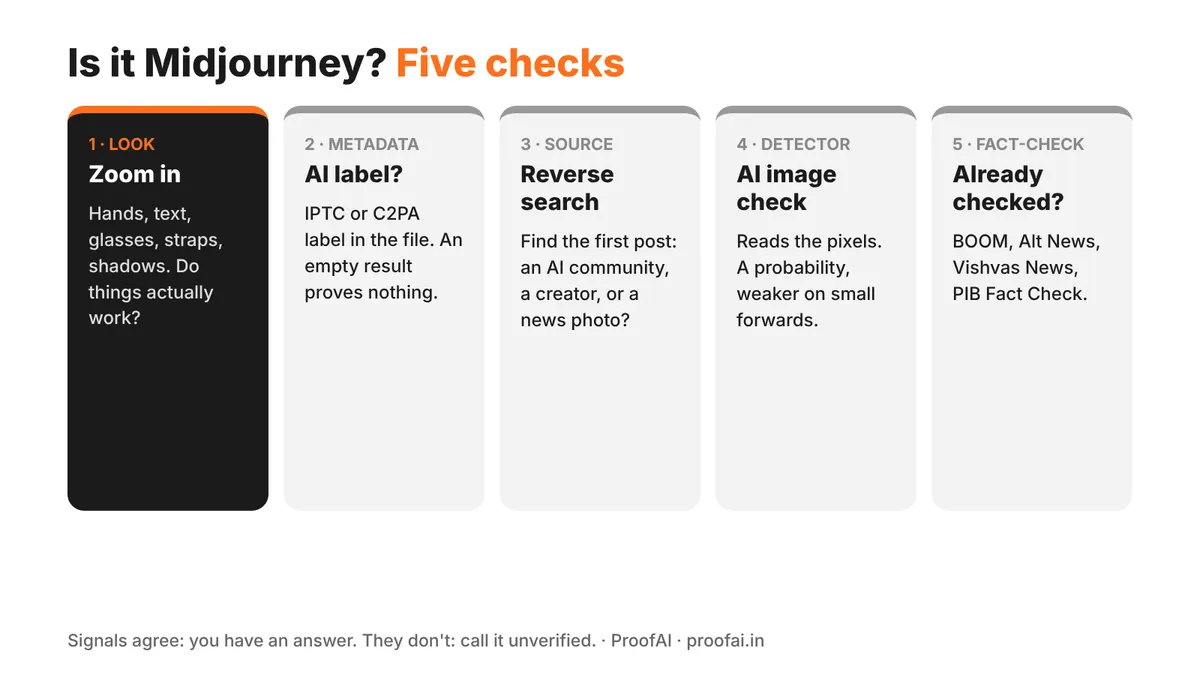
Five checks for a suspected Midjourney image: look closely, read the metadata, reverse search, AI image detector, fact-check
Step 2: Check the metadata, but do not trust an empty result
Some AI images carry a label inside the file. In 2023, the IPTC (the news-media standards body) reported that Midjourney had signed up to mark its images with the IPTC "Digital Source Type" property, the same marker Google uses to signal generative AI content (IPTC). We could not confirm in Midjourney's own documentation exactly what its downloads contain today, so expect it to vary by version and by how the image was saved.
Upload the file to our free Content Credentials checker. It reads C2PA Content Credentials, IPTC AI labels and EXIF camera data in your browser; nothing is uploaded. It can tell you three things:
Also read: DeepSeek AI Detector: Can You Tell if DeepSeek Wrote a Text?
- An AI label is present. Strong evidence the image came from an AI tool.
- Camera data is present (make, model, lens, exposure). A hint of a real camera, but EXIF can be edited, so it is not proof.
- Nothing is found. Very common, and it proves nothing. Messaging and social apps often strip this metadata (Content Authenticity Initiative), and a screenshot removes it too.
What about Google's SynthID watermark? It is Google's own system for images from Google AI tools, so a SynthID check will not find anything on a Midjourney image. Our SynthID guide explains what it can and cannot tell you.
Step 3: Reverse image search to find the source
Where an image first appeared often settles the question faster than any tool. Search it with Google Lens or TinEye and look for:
- The earliest post. AI images are often first shared in Midjourney communities or on a creator's account. The Pope puffer image was first posted to a Midjourney subreddit (The Verge).
- A creator's mark. In 2023, BOOM traced a viral photo of Prime Minister Narendra Modi looking through a microscope through a small watermark in the corner to an Instagram creator who posts AI images, then recreated a very similar picture with Midjourney itself (BOOM).
- Group or caption context. A viral picture of Tom Cruise with his "stunt doubles" turned out to come from a Facebook group for Midjourney users (BOOM).
- Real photos of the same event. If something big really happened, news agencies and many people will have photographed it from different angles.
Step 4: Run an AI image detector
An AI image detector looks at the pixels themselves, so it works even when metadata is gone. Upload the image to ProofAI's AI image detector (JPG, PNG or WebP). It is free for 10 checks a day without logging in, and the result is a probability that the image is AI-generated.
Read the result as one signal. A high score with visible artifacts and a Midjourney community source is a clear answer. A borderline score on a small, compressed forward is weak evidence either way. Heavy compression, cropping and edits all make detection harder for every detector, ours included.
Step 5: Ask the fact-checkers
If the image is about news, politics, a public figure or a disaster, someone may already have checked it. Search the claim with words like "fact check" on BOOM, Alt News, Vishvas News or PIB Fact Check (for government-related claims). Most run WhatsApp tiplines; our WhatsApp photo guide lists how to reach them. BOOM keeps a tag page of its fact-checks about Midjourney images (BOOM).
Putting the signals together
| Signal | Points to Midjourney or other AI | Points to a real photo |
|---|---|---|
| Close look | Broken hands, text, objects or shadows | Nothing odd, but this alone proves little |
| Metadata | An AI label (IPTC or C2PA) | Original camera data plus a credible source |
| Reverse search | First posted in an AI community or by an AI creator | Earlier copies from news agencies or the photographer |
| AI image detector | High AI probability | Low AI probability on a good-quality copy |
| Fact-checkers | Debunked as AI | Verified as a real photo |
Two or three signals agreeing is a much stronger answer than any one check. If they disagree, say "unverified" and do not share the image as real.
Limitations
No method is perfect. Visual clues fade as generators improve, metadata is easy to remove, reverse search finds nothing for brand-new images, and AI image detectors, ProofAI's included, can be wrong on heavily compressed, cropped or edited files. A real photo can also mislead if it is old or from another place. That is why the source and the fact-check matter as much as the pixels.
FAQ
How can I tell if an image was made with Midjourney? Look for broken details such as hands, text and objects that do not work, check the metadata with a Content Credentials checker, reverse-search the image to find its first post, run an AI image detector, and look for a fact-check. Several signals together are more reliable than one.
Is there a Midjourney detector? There is no official public detector from Midjourney that we could find. General AI image detectors check for signs of AI generation in the pixels, and metadata readers look for AI labels such as the IPTC Digital Source Type that Midjourney agreed to use in 2023 (IPTC).
Does Midjourney add a watermark to its images? We found no Midjourney documentation of an invisible pixel watermark like Google's SynthID. Some files carry an IPTC AI label in their metadata, but it is easily lost when images are shared (Content Authenticity Initiative).
Can people reliably spot AI images by eye? Not reliably. In Microsoft's "Real or Not" quiz, participants were right only about 62% of the time (PCWorld). Use visual clues as a first step, not a verdict.
What should I do if I cannot tell whether an image is real? Treat it as unverified. Do not forward it as real, check whether a fact-checker has covered it, and if it matters, send it to a fact-checking tipline.
Conclusion
Telling a Midjourney image from a real photo in 2026 is less about spotting six fingers and more about stacking evidence: a close look, the metadata, where the image first appeared, a detector score and a fact-check. When the signals agree, you can say so with confidence; when they do not, the honest answer is "unverified".
Published by
AI tools may assist with drafting; a team member checks and approves every article before it is published. How we write and correct articles.
Popular AI detection tools
Ready to Verify Your Content?
Get weekly insights on AI detection. Start your journey toward digital authenticity with our AI detection tools.