Is This WhatsApp Photo Real or AI? How to Check a Forward in 2 Minutes
Got a shocking photo in a WhatsApp family group? How to check if a forwarded photo is real or AI in two minutes, which Indian fact-checkers to ask, and when not to forward.
Short answer: save the photo, reverse-search it with Google Lens, run it through a free AI image detector, and search the claim on an Indian fact-checking site such as PIB Fact Check, BOOM, Alt News or Vishvas News. If you still cannot tell where it came from, do not forward it. These checks take about two minutes on a phone and need no special app.
A "photo" of a leader with a celebrity, a bus stuck on a new flyover, a "leaked" picture from a riot: forwards like these reach family groups every day, and more of them are now made with AI. This guide shows a quick routine anyone in the family can follow, explains what each check can and cannot prove, and lists the real places in India to verify or report a fake.
Try it: use ProofAI's AI picture detector, free for 10 checks a day with no login.
Why WhatsApp forwards are hard to check
An AI image can look perfect at phone size, and the forward itself tells you almost nothing about where it came from.
- The file loses information. WhatsApp compresses normal photos when they are sent; only files sent as documents keep their original quality (Engadget). Messaging and social apps also often remove the hidden metadata that could say which camera or AI tool made the image (Content Authenticity Initiative).
- The context is gone. A forward rarely says who took the photo, when, or where. The caption was often written by someone else.
- Real fakes are circulating. In February 2026 BOOM debunked a viral image of a bus "stuck" on the Mira-Bhayandar flyover near Mumbai; it was made with Gemini and still had a Gemini watermark in one corner (BOOM). In another case, a supposed old photo of Narendra Modi and Amit Shah turned out to be AI-generated after a reader sent it to BOOM's WhatsApp tipline (BOOM).
The 2-minute check
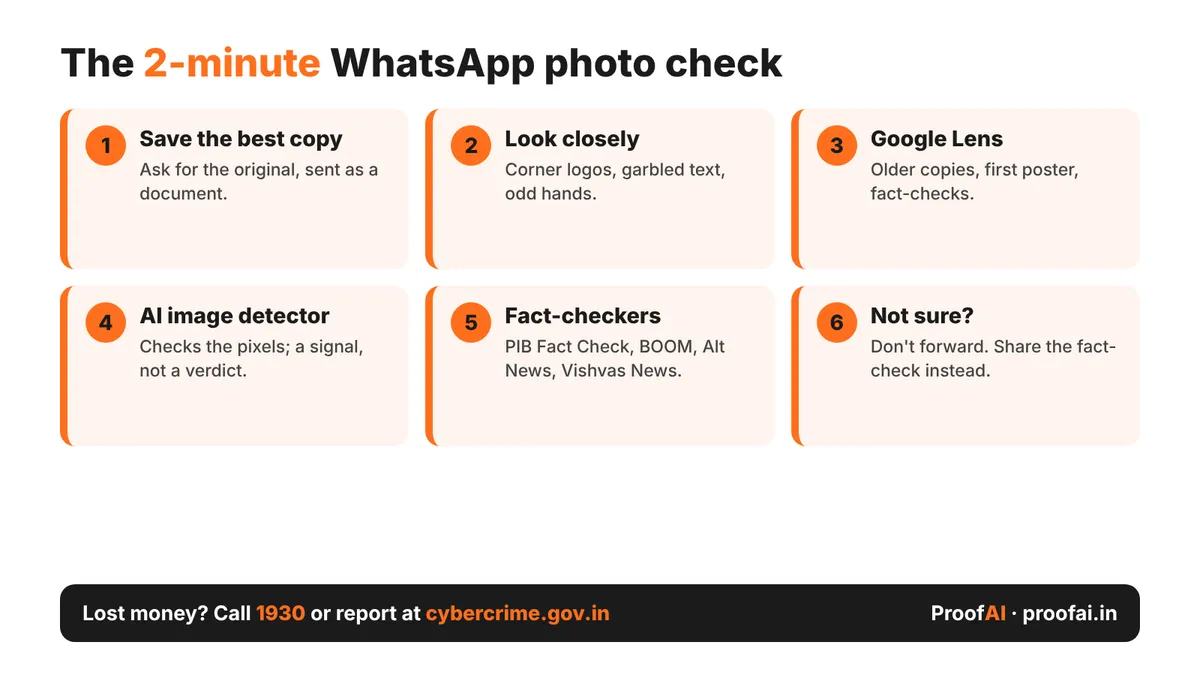
The 2-minute WhatsApp photo check: save the best copy, look closely, Google Lens, AI image detector, fact-checkers, do not forward if unsure
Want to check your own content? Try ProofAI free 10 checks a day, no login needed.
Step 1: Save the best copy you can get
Download the photo to your phone. If you know the person who first posted it, ask them to send the original as a document, which avoids WhatsApp's compression (Engadget). A clearer file gives every check below a better chance. Avoid screenshots of screenshots if you can.
Step 2: Look closely for a few seconds
Zoom in before running any tool. Look for a small logo or sparkle in a corner (the flyover fake still had its Gemini mark, as BOOM showed above), garbled text on signs and number plates, odd hands and fingers, and lighting that does not match. These signs are clues, not proof: good AI images may show none of them.
Step 3: Reverse image search with Google Lens
Open the photo in Google Lens (or the Google app) and search with it. You are looking for:
- Older copies. If the same photo appeared years ago, the "breaking news" caption is false.
- The first poster. An artist's page that says "made with AI" settles the question.
- A fact-check. Indian fact-checkers' articles often show up directly in the results.
Some WhatsApp versions also have a "Search on web" option in the photo menu that sends the image to Google; it first appeared in a 2024 beta (9to5Google). If you do not see it, saving the photo and using Lens works the same way.
Step 4: Run an AI image detector
Upload the photo to ProofAI's free AI image detector. It looks at the pixels themselves, so it does not need any metadata. You can also ask the Gemini app "Was this created with Google AI?" to check for Google's SynthID watermark (Google); our SynthID guide explains what that result means.
Also read: SynthID Explained: How to Check if an Image Was Made With Google AI
What about our Content Credentials checker? It reads C2PA Content Credentials, IPTC AI labels and camera data inside the file, in your browser. On a WhatsApp forward it will usually find nothing, because that information has been stripped along the way. An empty result proves nothing either way; it is much more useful on an original file.
Step 5: Search the claim on a fact-checking site
Type the key words of the claim on these sites, or send the photo to their WhatsApp tiplines:
| Fact-checker | Best for | How to ask |
|---|---|---|
| PIB Fact Check | Claims about the Government of India, schemes, ministries | WhatsApp +91 8799711259 or the web portal (PIB FAQ) |
| BOOM | Viral images, deepfakes, scams | WhatsApp tipline 7700906588 (BOOM) |
| Alt News | Political and communal misinformation | WhatsApp link on altnews.in |
| Vishvas News | Hindi and regional-language forwards | WhatsApp 9205270923 (Vishvas News) |
PIB Fact Check only takes up claims related to the Government of India and its ministries, departments and public sector bodies (PIB FAQ). For AI-generated audio and video, the Deepfakes Analysis Unit of the Misinformation Combat Alliance also runs a WhatsApp tipline.
Step 6: Check who sent it, and where it started
Ask the person who forwarded it where they got it. "Forwarded many times" means nobody in the chain knows. If the photo is about a real event, check whether a major news outlet or the official account of the person or department shows the same picture. Real news is rarely only on WhatsApp.
Step 7: If you are not sure, do not forward
You do not need to prove a photo is fake to stop it. If the checks above leave you unsure, do not forward it, and if it is already in your family group, reply with the fact-check link instead of an argument.
When a fake photo is part of a scam
Some AI photos are bait: a celebrity "offer", a fake relief scheme or a prize that asks for a payment.
- Report suspicious calls, SMS and WhatsApp messages on Chakshu in Sanchar Saathi, even if you did not lose money.
- If you lost money, report it at cybercrime.gov.in or call the cyber crime helpline 1930, as Sanchar Saathi advises.
- Festive offers are a favourite format; our Diwali scams guide shows the common patterns.
What these checks cannot do
No tool gives a perfect answer on a forward. Compression removes detail that AI image detectors use, so results on heavily forwarded photos are less reliable, and a detector score is a probability, not a verdict. A missing watermark or empty metadata does not mean a photo is real. And a real photo can still be misleading if it is old or from another place, which is why the reverse search and the fact-check matter most. For videos, use our deepfake video checklist.
FAQ
How can I tell if a WhatsApp photo is AI-generated? Save it, look for a corner logo and odd details, reverse-search it with Google Lens, and run it through an AI image detector. Then search the claim on PIB Fact Check, BOOM, Alt News or Vishvas News. Several signals together are more reliable than any single one.
Does WhatsApp remove photo metadata? Messaging and social apps often strip metadata (Content Authenticity Initiative), and WhatsApp compresses normal photos unless they are sent as documents (Engadget). Expect a forwarded photo to carry little or no information about where it came from.
Where can I send a WhatsApp forward to be fact-checked in India? PIB Fact Check takes government-related claims on WhatsApp +91 8799711259 (PIB FAQ). BOOM, Alt News and Vishvas News also run WhatsApp tiplines, listed on their websites.
Can Google tell me if a photo is AI? Google can check for its own SynthID watermark through the Gemini app, Search and Chrome (Google). That covers images made with Google AI and its partners, not every AI tool; see our SynthID guide.
Is it wrong to forward a photo if I'm not sure it's real? If you cannot confirm it, the safest choice is not to forward it. A fake shared by a trusted relative is believed more easily, so a pause from you can stop it spreading in the whole group.
Conclusion
Checking a WhatsApp photo takes about two minutes: save it, look closely, reverse-search it, run an AI image detector, and look for a fact-check. When the checks do not give a clear answer, the best thing you can do for your family group is simple: do not forward it.
Published by
AI tools may assist with drafting; a team member checks and approves every article before it is published. How we write and correct articles.
Popular AI detection tools
Ready to Verify Your Content?
Get weekly insights on AI detection. Start your journey toward digital authenticity with our AI detection tools.