SynthID Explained: How to Check if an Image Was Made With Google AI
What SynthID is, how to check if an image was made with Gemini or other Google AI using Google's own tools, its limits, and a practical routine for any image.
Short answer: SynthID is Google's invisible watermark for AI-generated content. To check whether an image was made or edited with Google AI, upload it to the Gemini app (or Google's SynthID Detector) and ask "Was this created with Google AI?". A "no watermark" result only means no SynthID was found, so for anything else run a Content Credentials check and an AI image detector, and trace where the image came from.
This guide explains what SynthID is, which tools add it, the methods Google documents for checking it, what it cannot tell you, and a five-minute routine that works for any suspicious image.
Try it: use ProofAI's AI photo detector, free for 10 checks a day with no login.
What is SynthID?
SynthID is a watermarking tool built by Google DeepMind. According to DeepMind's SynthID page, it embeds digital watermarks directly into AI-generated images, audio, text or video; the watermark is imperceptible to people but can be detected by SynthID's own technology. For images and video, DeepMind says the watermark is added the moment the content is created, does not change quality, and is designed to stand up to cropping, filters, changed frame rates and lossy compression.
The key point: SynthID lives in the pixels, not in the file's metadata. That is why it can survive a screenshot or a re-save that would wipe out normal metadata, and also why tools that only read metadata, including ours, cannot see it.
Google introduced SynthID in 2023 and says it has since watermarked over 180 billion images and videos, along with 240,000 years of audio (Google, October 2026).
Which tools add SynthID?
SynthID is added by Google's own generative models. Google lists content from its Gemini, Imagen, Lyria and Veo models across Google (Google blog), and at I/O 2026 it said videos made with Gemini Omni carry the watermark too (I/O 2026 announcements). In practice, that covers images made with Google's Nano Banana image models in the Gemini app and other Google AI products (Google blog).
Want to check your own content? Try ProofAI free 10 checks a day, no login needed.
Some other companies now use it as well. Google has partnered with NVIDIA to watermark video from its Cosmos models, and said at I/O 2026 that OpenAI, Kakao and ElevenLabs are bringing SynthID to more of their AI-generated content (Google, May 2026).
How to check for SynthID today
Google documents three ways for an ordinary person to check.
1. Ask Gemini
Upload the image to the Gemini app and ask a question such as "Was this created with Google AI?" or "Is this AI-generated?". Gemini checks for the SynthID watermark and adds its own reasoning to the answer (Google blog). DeepMind says the same works for video and audio clips (SynthID page).
2. Ask in Google Search, Lens or Chrome
Google says SynthID verification has come to Search and Chrome: you can use Lens, AI Mode and Circle to Search, or Gemini in Chrome, and ask "Is this made with AI?" (Google, May 2026). On an Android phone that supports it, Circle to Search is the quickest route: circle the image and ask.
3. Use the SynthID Detector
The SynthID Detector is a standalone portal. Google opened it to everyone, globally and in English, in October 2026, and says it can check whether an image, video or audio file was made with AI from Google or partners including OpenAI, NVIDIA, Kakao and Apple (Google, October 2026). When it finds a watermark, the portal highlights the parts of the content most likely to carry it (Google blog).
Also read: Is ZeroGPT Accurate? What Tests Show and How to Check Fairly
Fact-checkers already use these tools. When a video of bees swarming a motorcycle being filled with E85 fuel went viral in India, BOOM found a Gemini logo on it and confirmed a SynthID watermark with Google's detection tool (BOOM).
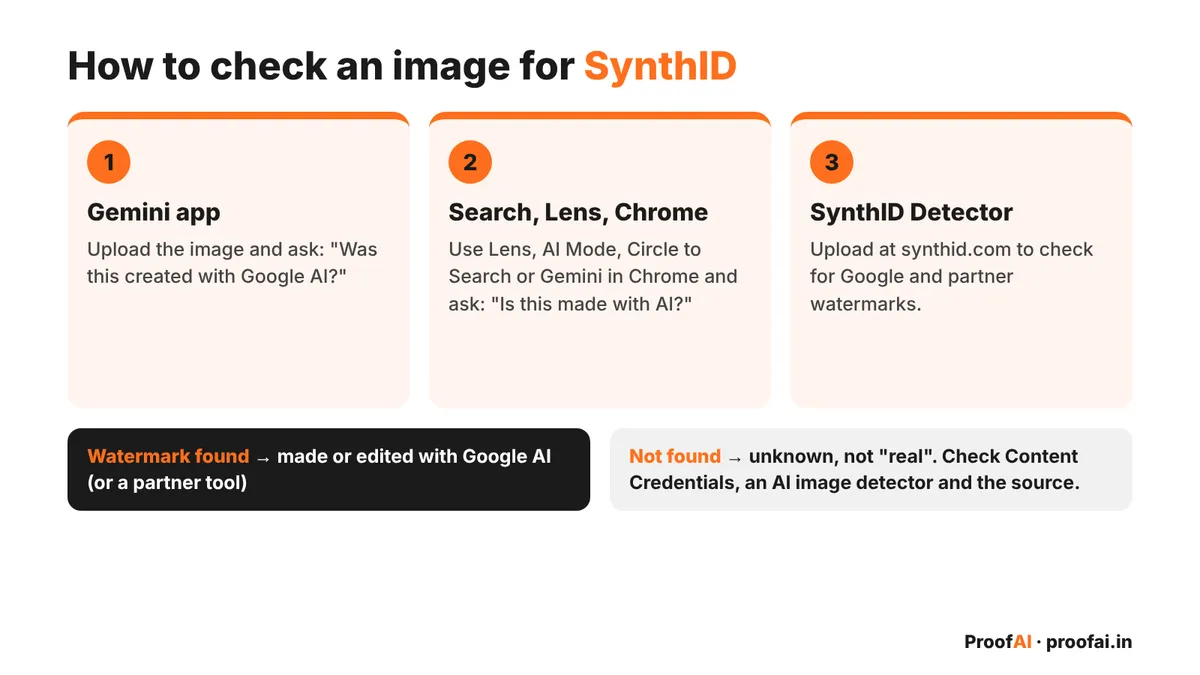
How to check an image for SynthID: Gemini app, Search and Lens, SynthID Detector, and what each result means
What SynthID cannot tell you
SynthID is useful, but it answers a narrow question: "does this carry Google's watermark?". Keep these limits in mind.
- It only finds its own watermark. An image from a generator that does not use SynthID will come back clean. Google says it will extend its checks to C2PA Content Credentials so that content from outside Google's ecosystem can be traced too (Google blog).
- "Not found" is not "real". No watermark can mean a camera photo, or an image from another AI tool, or a watermark that was damaged.
- Heavy edits can break it. DeepMind said at launch that SynthID "isn't foolproof against extreme image manipulations" (DeepMind).
- It is not a general AI detector. It does not judge whether pixels look AI-made; it looks for a signal that was put there on purpose.
- "Found" means Google or partner AI touched it, which can include an edit to a real photo. Gemini's check covers images "generated or edited" by Google AI (Google blog).
SynthID vs C2PA Content Credentials vs IPTC labels
These three are often confused. They are different layers, and an image can have any of them, all of them, or none.
| SynthID | C2PA Content Credentials | IPTC AI label | |
|---|---|---|---|
| Where it lives | Inside the pixels (invisible watermark) | Signed metadata attached to the file | A metadata field in the file |
| Who adds it | Google AI and partners | Cameras, editing apps and AI tools that support C2PA | Any software that writes metadata |
| Survives a screenshot or re-upload? | Designed to | Often stripped | Often stripped |
| How to read it | Gemini, Google Search/Lens, Chrome, SynthID Detector | A Content Credentials reader | A metadata reader |
C2PA Content Credentials are a signed record of where a file came from and how it was edited. Google says images generated by Nano Banana Pro in the Gemini app, Vertex AI and Google Ads carry C2PA metadata (Google blog), and that "About this image" in Google Images, Lens and Circle to Search uses C2PA metadata to show whether an image was created or edited with AI (Google blog). The weakness: the Content Authenticity Initiative notes that it is still common for social media and content platforms to remove metadata.
IPTC labels are a simpler metadata field called Digital Source Type. Google supports values such as trainedAlgorithmicMedia for an image created by an AI model and compositeWithTrainedAlgorithmicMedia for AI edits like inpainting (Google Search Central). Anyone can write or delete this field.
A practical routine for any suspicious image
SynthID covers one family of tools. Use this routine to cover the rest.
- Check with Google first. Upload the image to Gemini or the SynthID Detector, or use Circle to Search, and ask if it was made with Google AI. If SynthID is found, you have your answer about Google-made content.
- Read the file's own labels. Drop the original file into our free Content Credentials checker. It reads C2PA Content Credentials, IPTC AI labels and EXIF camera data right in your browser, and nothing is uploaded. It does not read SynthID, and it shows a C2PA signature without cryptographically validating it; for that, use Content Credentials Verify.
- Check the pixels. Run the image through an AI image detector. A detector looks at the image itself, so it can flag AI images that carry no watermark or label. Treat the score as a signal, not a verdict.
- Trace the source. Do a reverse image search with Google Lens to find earlier copies, the first poster, and any fact-checks. This step often settles the question on its own.
- Weigh it together. A SynthID hit or a signed AI credential is strong evidence. A high detector score plus no traceable source is a warning. Nothing found anywhere means "unknown", not "real".
For videos, pause on a few clear frames and check them the same way; our deepfake video checklist covers the rest. ProofAI's own video detection is coming soon.
FAQ
What is SynthID? SynthID is Google DeepMind's invisible watermark for AI-generated images, video, audio and text. It is added when Google AI creates the content and can be detected by Google's tools, but not by the human eye (DeepMind).
Is there a free SynthID detector? Yes. Google opened its SynthID Detector to everyone in October 2026, and you can also ask the Gemini app, Google Search (Lens, AI Mode, Circle to Search) or Gemini in Chrome whether an image was made with Google AI (Google).
How do I check if an image was made by Gemini? Upload it to the Gemini app and ask "Was this created with Google AI?". Gemini checks for SynthID and explains what it finds (Google). A visible Gemini logo in a corner is another clue, but it is easy to crop out.
Can SynthID detect images from ChatGPT, Midjourney or other tools? Only tools that use SynthID. Google lists OpenAI, NVIDIA, Kakao and Apple as partners for its Detector (Google); images from other generators need a general AI image detector and a source check.
Can the watermark be removed? SynthID is designed to survive common edits like cropping, filters and compression, but DeepMind says it is not foolproof against extreme manipulation (DeepMind). That is why a missing watermark never proves an image is real.
Conclusion
SynthID gives a clear answer to one question: was this made or edited with Google AI (or a partner)? Check that first with Gemini, Search or the SynthID Detector, then read the file's own labels with the Content Credentials checker, scan the pixels with an AI image detector, and trace the source. Together, those steps tell you far more than any single tool.
Published by
AI tools may assist with drafting; a team member checks and approves every article before it is published. How we write and correct articles.

Popular AI detection tools
Ready to Verify Your Content?
Get weekly insights on AI detection. Start your journey toward digital authenticity with our AI detection tools.